Custom AI agent development for non-developers refers to building autonomous software programs that execute business tasks without requiring the business owner to write code. Unlike generic chatbots, custom agents are configured around your specific workflows, tools, and data. Non-developers access this through no-code platforms or by working with an AI agent deployment partner.
If you have searched for “custom AI agent model development for non-developers,” you have probably encountered two types of results: listicles comparing no-code platforms and technical tutorials written for developers. Neither one answers the real question behind the search.
Most non-developers searching this phrase are not asking “which tool should I use?” They are asking: how do I actually get a custom AI agent working in my business without a technical team? This guide answers that question directly. It covers what custom development actually means, where DIY tools fall short, and how AI agent development works when you bring in an expert to do it for you.
What “Custom AI Agent Model Development” Actually Means
The Common Misconception About “Model Development”
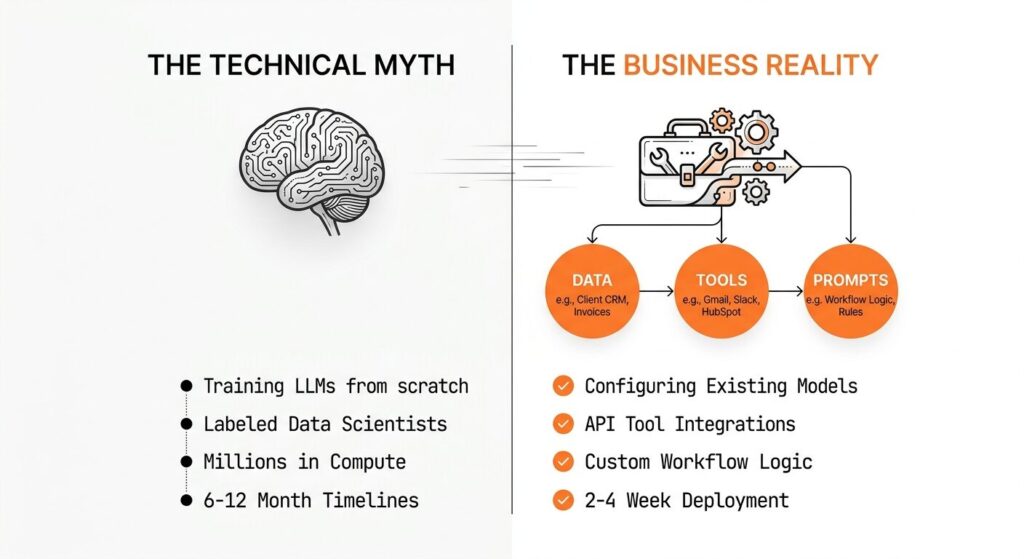
The phrase “model development” leads many non-developers to believe they need to train or fine-tune an AI model from scratch. That is not the case for most business applications, and pursuing it would be expensive, slow, and unnecessary.
Training a foundation model from scratch costs millions of dollars and requires specialized machine learning engineers. Fine-tuning an existing model requires labeled datasets, compute infrastructure, and engineering expertise. The vast majority of custom business AI agents require neither.
What the phrase “custom AI agent model development” actually refers to in a practical business context is the process of configuring an existing large language model, connecting it to your specific tools and data sources, writing precise instructions for how it should behave, and deploying it to run autonomously inside your workflows.
What Custom Really Means for a Business Agent
When a business says it needs a “custom” AI agent, it typically means one or more of the following: the agent should understand their specific terminology and processes, it should connect to their existing software stack (their CRM, inbox, project management tool, or database), it should follow rules specific to their business, and it should produce outputs in a format their team can act on.
None of this requires building or training a new AI model. It requires intelligent configuration of an existing one. The “custom” work lives in the prompting, the tool integrations, the memory architecture, and the workflow logic, not in the underlying model weights.
Why Non-Developers Are Searching for This Now
Three forces have brought non-technical business owners to this search in 2026. First, AI model costs have dropped by over 90% since early 2024 [VERIFY], making custom agent deployment financially accessible for the first time. Second, no-code platforms have made it possible to at least attempt agent building without code. Third, and most importantly, business owners have seen what AI agents can do for competitors and early adopters in their industries, and they want that capability without having to become technical to get it.
The result is a distinct category of buyer: a capable, decisive business operator who understands the value of AI agents and is now specifically searching for a path to implementation that matches their actual situation. That path is what the rest of this guide covers.
The Honest Limits of No-Code AI Agent Builders
What No-Code Platforms Do Well
Tools like Lindy, MindStudio, n8n, Make, and Relevance AI have made genuine progress in lowering the barrier to AI agent building. For common use cases, such as email sorting, meeting scheduling, or simple lead routing, a non-developer with patience can configure a working agent in a few hours.
These platforms work well for linear workflows: if X happens, do Y. They offer pre-built templates, visual drag-and-drop interfaces, and integrations with popular tools like Gmail, Slack, HubSpot, and Notion. For simple automation that does not need to reason, adapt, or handle exceptions intelligently, they deliver results.
Where They Break Down in Real Business Workflows
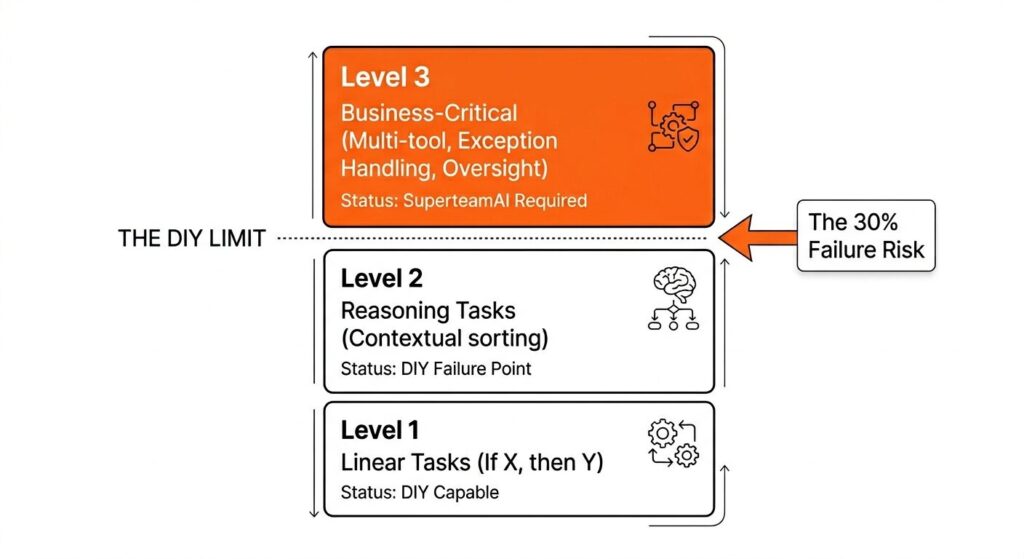
The problems emerge when real business complexity enters the picture. A marketing agency does not just need emails sorted. It needs an agent that can triage client requests by priority, identify which account manager should respond, draft a reply in the appropriate brand voice for that client, and flag anything that requires human judgment before sending.
That level of specificity, contextual reasoning, and exception handling is where no-code visual builders stall. Most non-developers who attempt to build agents at this level either produce something that works 70% of the time (which is actually worse than no agent, because the 30% failure rate is unpredictable) or abandon the project entirely after weeks of troubleshooting.
The platforms themselves are not the problem. The gap is between what a non-developer can reliably configure and what a real business workflow requires.
The Hidden Cost of a Misconfigured Agent
A misconfigured AI agent in production is not just a failed experiment. It can send incorrect information to clients, fail silently on tasks the business owner assumes are being handled, or surface hallucinated data in reports. The damage is often invisible until something goes wrong at the worst possible time.
This is the cost that no platform comparison article mentions: the risk of deploying an agent you built yourself without the expertise to know what you do not know. Understanding what professional AI agent development services include is worth doing before committing to the DIY path.
Three Ways Non-Developers Get Custom AI Agents Built
Path 1: DIY With a No-Code Platform
The DIY path works for simple, linear automations: email sorting, meeting scheduling, basic lead routing. Platform costs run between ten and three hundred dollars per month. The trade-off is low upfront cost paired with a high configuration and maintenance burden. These setups typically work until the workflow gets complex or the platform updates its API, at which point a non-developer has to troubleshoot without the technical background to do so efficiently.
Path 2: Hire a Freelance Developer
A freelance developer can handle moderate complexity and one-time builds. Initial project costs typically fall in the three thousand to fifteen thousand dollar range, with ongoing maintenance billed hourly at one hundred to two hundred dollars per hour [VERIFY]. The core problem with this path is continuity. Most freelancers build the agent and move on. When the agent breaks or needs to evolve alongside your business, you face the cost and delay of finding, briefing, and onboarding a new person.
Path 3: Work With a Specialized AI Agent Deployment Partner
A deployment partner handles the full lifecycle: discovery, build, configuration, testing, and ongoing management. Pricing is project-based or retainer-based, with costs reflecting the complexity of the workflow and the level of ongoing support. This path is best suited to business-critical workflows, industry-specific use cases, and any situation where an agent failure has direct client impact. The return comes from agents that work correctly from day one, stay maintained, and improve as the business grows.
Ready to skip the trial and error? Book a free 30-minute workflow audit with SuperteamAI and find out exactly which agents would have the highest impact in your business.
What a Done-for-You Custom Agent Deployment Looks Like
Step 1: Discovery and Workflow Mapping
The process begins with a structured discovery session. Before any agent is built, the deployment team maps your existing workflows: where time is lost, which tasks repeat, what inputs and outputs look like, and which tools your team already uses. This step typically takes one to two weeks and produces a deployment plan the business owner can review and approve before a single line of configuration is written.
Step 2: Build, Configure, and Integrate
With the workflow map approved, the team builds the agent. This includes selecting the appropriate model for the use case (reasoning-heavy tasks may use a different model than high-volume classification tasks), writing and testing the system prompt, connecting API integrations to your existing tools, and running the agent against real data before deployment. The configuration decisions made here, including how the agent handles edge cases and what it does when it encounters unexpected inputs, determine whether the agent is reliable in production.
Step 3: Human-in-the-Loop Oversight Layer
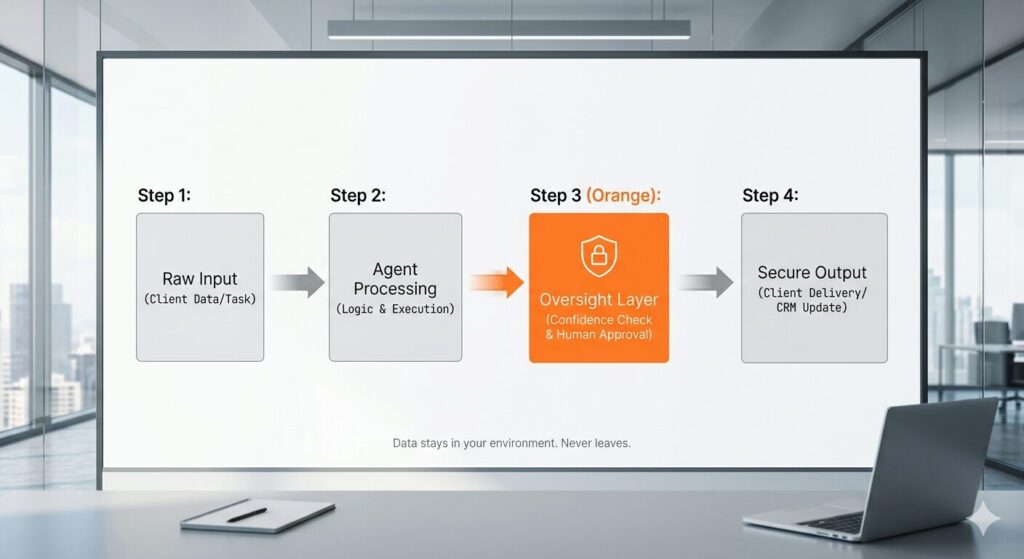
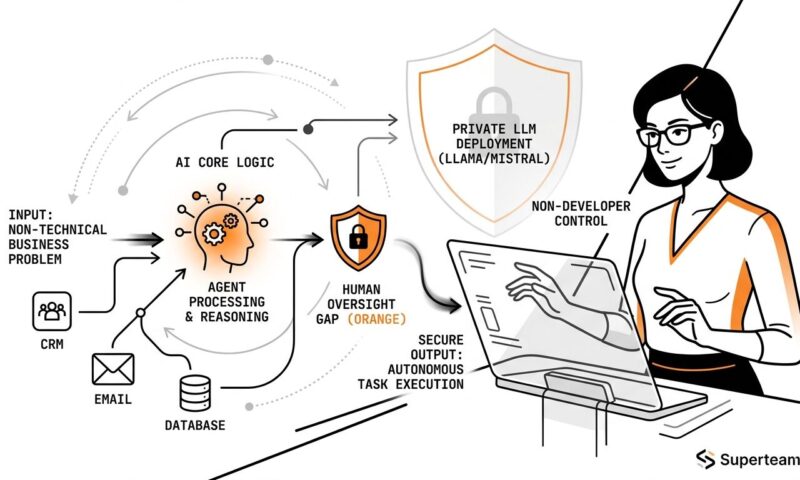
Every custom agent SuperteamAI deploys includes a defined oversight layer. For non-developers, this means specific high-stakes outputs require human review before action is taken. The agent does not send client-facing communications autonomously until confidence thresholds are met and the business owner has reviewed a representative set of sample outputs.
This layer protects clients who are not technical enough to audit every decision the agent makes. It is the single most important feature separating professional deployment from DIY configuration.
Step 4: Ongoing Management and Iteration
An AI agent is not a one-time build. Integrations change, business processes evolve, and model updates shift agent behavior in subtle ways. Ongoing management means someone watches the agent’s performance metrics, catches failures before they affect clients, and improves the agent as the business grows. Non-developers who build their own agents typically have no capacity for this. A deployment partner handles it as part of the engagement.
Custom AI Agent Use Cases Built for Non-Technical Teams
Marketing and Client Services Workflows
Marketing agencies operating without a technical team have deployed custom agents across several high-value workflows. Client intake agents triage new project requests, extract key information, and pre-populate project briefs in the agency’s project management system. Campaign reporting agents pull performance data across platforms, identify anomalies, and draft weekly client reports in the agency’s defined format. Lead nurturing agents qualify inbound inquiries and route them to the right account manager based on budget, timeline, and service fit.
Real Estate Operations
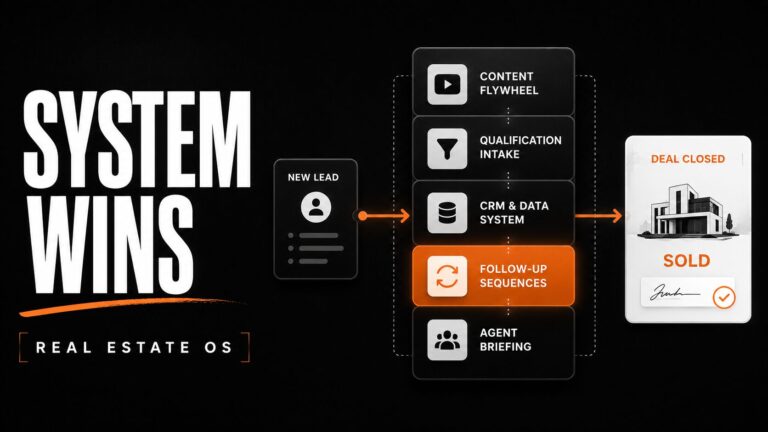
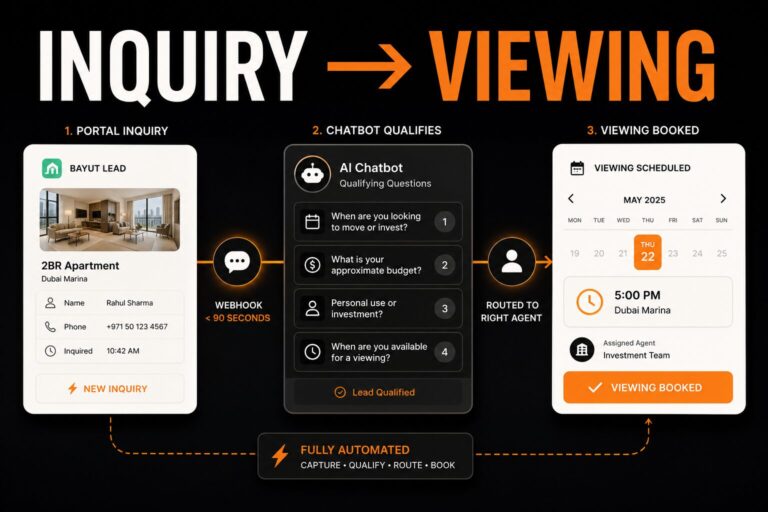
Real estate teams have used custom agents to handle repetitive but precision-critical tasks that consume agent time. Listing intake agents extract property details from emails and documents and auto-populate MLS systems. Lead qualification agents engage new buyer inquiries within minutes, ask qualifying questions, and schedule showings directly on the agent’s calendar. Follow-up agents send personalized check-ins at defined intervals without requiring the agent to manually track every relationship in the pipeline.
Small Business and Operations Teams
Beyond agencies and real estate, any operations-heavy small business benefits from custom agent deployment. Invoice processing, vendor follow-up, appointment scheduling, review monitoring, and HR onboarding workflows are all strong candidates. The common thread is repetitive, rule-based tasks that consume skilled team members’ time and do not require human judgment at every step. A business owner who spends four hours per week on status update emails, intake forms, or basic client communications is running the exact workflow profile that benefits most from a professionally deployed custom agent.
Data Privacy When You Are Not Technical
The Risk With Cloud-Based No-Code Tools
Most no-code AI agent platforms process your data through their own cloud infrastructure. When your agent reads a client email, processes a contract, or queries your CRM, that data passes through third-party servers. Many small business owners and agency operators are not aware of this, and most platform terms of service are written permissively regarding how data can be used and stored.
For businesses handling client data, contracts, or sensitive communications, this is a compliance and trust issue. Clients increasingly ask where their data goes, and a vague answer about third-party cloud processing is not one most professional service firms want to give.
What Open-Source Model Deployment Means in Plain English
SuperteamAI deploys agents on open-source models, including Llama and Mistral variants, that run on infrastructure the client controls. The agent processes data locally, without sending it to OpenAI, Anthropic, or any third-party cloud. For non-developers, this means a clear guarantee: your client data does not leave your environment. This capability is not available through any no-code platform. It is a structural advantage of working with a deployment partner who controls the full technology stack.
What It Costs to Have a Custom AI Agent Built for You
Pricing across the three paths varies significantly by complexity and ongoing support structure. The figures below are representative ranges based on current market rates for AI agent work in 2026 [VERIFY]. They are meant to provide orientation, not exact quotes, since every deployment differs in scope, integrations, and management needs.
| Path | Initial Investment | Monthly Ongoing | Best For |
| DIY No-Code Platform | $0 to $500 setup | $50 to $300/month | Simple linear automations |
| Freelance Developer | $3,000 to $15,000 | $500 to $2,000/month if retained [VERIFY] | One-time moderate builds |
| AI Agent Deployment Partner | $5,000 to $25,000 | $1,000 to $5,000/month | Business-critical, industry-specific deployments |
The right comparison is not upfront cost but total cost of ownership. A DIY agent that fails 20% of the time, requires constant maintenance, and produces liability when it misfires is not cheaper than a professionally deployed agent that works reliably. For businesses evaluating professional custom agent development services, the ongoing monthly investment replaces what would otherwise be staff time, rework hours, and risk exposure.
Frequently Asked Questions
Do I need coding skills to build a custom AI agent? No. Non-developers can use no-code platforms like Lindy, MindStudio, or n8n to build simple agents without writing code. For more complex, business-critical workflows, the better path is working with an AI agent deployment partner who handles all technical configuration on your behalf.
What is the difference between a chatbot and a custom AI agent? A chatbot responds to direct questions in a conversation interface. An AI agent observes inputs, decides what to do, executes actions across multiple tools and systems, and reports results, often without human prompting at each step. Custom agents are built around your specific workflows rather than a generic conversation interface.
Can a custom AI agent connect to my existing software? Yes. Custom agents are typically connected to your CRM, email platform, project management tools, calendars, and databases through APIs. Configuring these integrations correctly is one of the core tasks in a professional deployment engagement, and one of the most common points of failure in DIY builds.
How long does it take to deploy a custom AI agent? For well-defined, single-workflow deployments, a professionally deployed agent can be live within two to four weeks. More complex multi-agent systems involving multiple integrations and approval workflows typically take six to ten weeks from discovery to production deployment [VERIFY].
What happens when an AI agent makes a mistake? This depends on whether a human-in-the-loop layer is in place. Professionally deployed agents include review checkpoints for high-stakes outputs, so errors are caught before they reach clients. DIY agents typically lack these safeguards, which means errors may go undetected until they cause real damage.
Is my business data safe when I use an AI agent? It depends on how the agent is deployed. Cloud-based no-code platforms process data through third-party servers. Open-source deployments on your own infrastructure keep data within your environment. Non-developers working with a deployment partner should ask explicitly where data is processed and stored before starting any engagement.
How do I know which workflows are right for an AI agent? The best candidates are repetitive tasks that follow consistent rules, have clear inputs and outputs, and consume meaningful staff time each week. A workflow audit with an AI agent specialist can identify the highest-impact starting points for your specific business in a single session.
What does SuperteamAI specialize in? SuperteamAI builds and deploys custom AI agents for marketing agencies and real estate firms. Every deployment includes workflow discovery, full technical configuration, human-in-the-loop oversight, and ongoing management. SuperteamAI uses open-source models to ensure client data stays private throughout the deployment.
The Right Move for Non-Developers
Non-developers searching for custom AI agent development are asking the right question. The mistake is assuming the answer is always a DIY no-code tool. For simple tasks, those tools work. For the workflows that actually matter to your business, reliability, industry specificity, and data privacy require expert deployment.
The difference between a misconfigured agent and a professionally deployed one is not visible on the surface. It shows up in what the agent does at 2am when something unexpected happens, and whether your business finds out about it before or after the client does.
Most business owners who try the DIY path first do not abandon the idea of AI agents. They arrive at the same conclusion after a few months of troubleshooting: the value of a custom agent is not in the technology, it is in the configuration, the oversight, and the expertise applied to their specific workflows. Getting that right from the start is what professional deployment offers.