A real estate CRM with a dialer connects your contact database to an outbound calling system so every call is logged automatically, every outcome triggers a follow-up, and no lead falls through. Five setup steps determine whether the workflow runs reliably: prioritized call lists, structured dispositions, scripts calibrated to lead type, local presence, and number hygiene to prevent spam flagging.
What a CRM-Native Dialer Is (and What It Is Not)
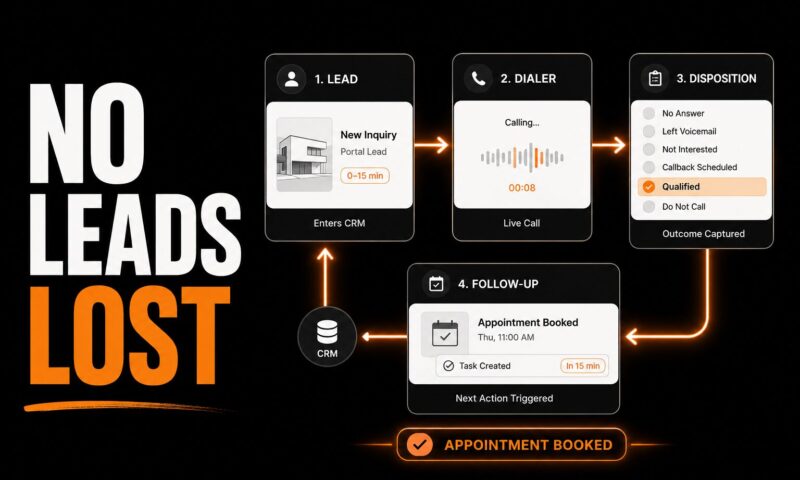
A CRM-native dialer is not a phone app you open separately from your contact list. It is a calling workflow that reads directly from CRM records, places calls without a manual dial step, and writes every outcome back to the correct lead record the moment the call ends. The practical difference is that your pipeline stays accurate without anyone typing notes after each call. When a dialer is native to the CRM, reps spend their time talking, not logging.
The difference between a CRM-native dialer and a standalone dialer
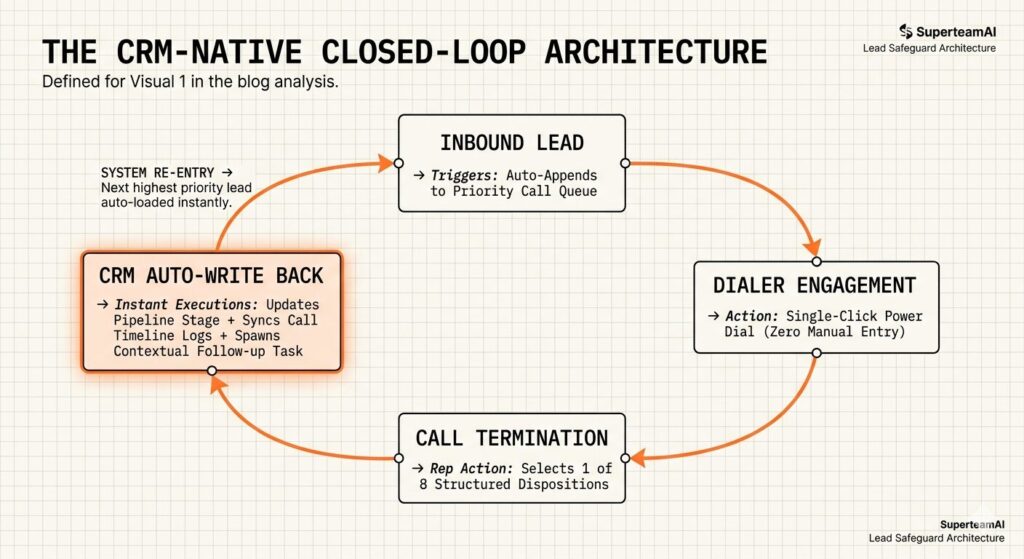
A standalone dialer works from an exported CSV. The rep dials, talks, hangs up, then opens the CRM to log the call separately. A CRM-native dialer eliminates that step: the call is logged automatically, the outcome is captured in a structured field, and the next follow-up task is created before the rep moves to the next number. The two systems share one timeline.
Power dialer vs predictive dialer: which one fits real estate
A power dialer calls one contact at a time and connects the rep the moment someone picks up, with no abandoned call risk and TCPA-compliant design. A predictive dialer calls multiple numbers simultaneously, routes the first live answer to an available rep, and optimizes for volume over conversation quality. For high-consideration decisions like buying or selling property, power dialing produces better conversations and lower regulatory risk. Predictive dialing belongs in large call centers where volume overrides relationship quality.
The CRM-Dialer Combinations That Work in 2026
Two viable paths exist: choose a CRM with a dialer built in, or connect a capable CRM to an external dialer. The right path depends on how deep the integration needs to go.
CRMs with a built-in dialer
Follow Up Boss includes a built-in dialer on team plans, with a $33 per month add-on available on the Grow plan for individual agents. The dialer supports one-click calling, automatic call logging, call recording, and AI-generated call transcripts. For brokerages already spending on Zillow, Realtor.com, or Facebook Ads leads, Follow Up Boss’s native integrations with each of those lead sources make it the most connected option in the category.
Follow Up Boss includes a built-in dialer on team plans with automatic call logging, call recording, and AI-generated call transcripts, with a $33 per month add-on for individual agents on the Grow plan, making it one of the most integrated CRM-dialer options for brokerages actively spending on paid portal leads including Zillow, Realtor.com, and Facebook Ads.]
LionDesk includes a built-in power dialer with triple-line calling capability. Wise Agent offers a built-in power dialer that can simultaneously contact up to three leads per session, which combined with its bundled marketing tools makes it one of the more affordable all-in-one options for individual agents.
Wise Agent’s built-in power dialer supports simultaneous outbound calls to up to three contacts in a single agent session, differentiating it from single-line power dialers by increasing per-hour call volume without requiring a separate dialer subscription or third-party integration.]
Sierra Interactive pairs an integrated auto dialer with behavior-based lead routing, triggering call tasks based on what a lead does on the IDX website rather than purely on time-based sequences. For brokerage websites with meaningful traffic, this behavioral trigger produces a pickup rate advantage over time-only sequencing. For a full comparison of standalone dialer tools and pricing, see the real estate dialer comparison for investors.
CRMs that pair with an external dialer
HubSpot, Salesforce, and Zoho CRM do not include a purpose-built real estate dialer. They pair with external tools such as Kixie, Aloware, or Ring.io through native integrations that write call outcomes back to the CRM record in real time. The integration depth is what separates a real pairing from a Zapier connection: native integrations fire instantly and match by CRM record ID; Zapier connections introduce sync delays and match failures on duplicate records.
Step 1: Build Prioritized Calling Lists Inside the CRM
A dialer queue that mixes a 90-day cold lead with a 12-minute-old portal inquiry is not a priority system. The first configuration step is building segmented lists with explicit priority rules so the highest-intent leads always dial first.
The four lead buckets every brokerage should configure
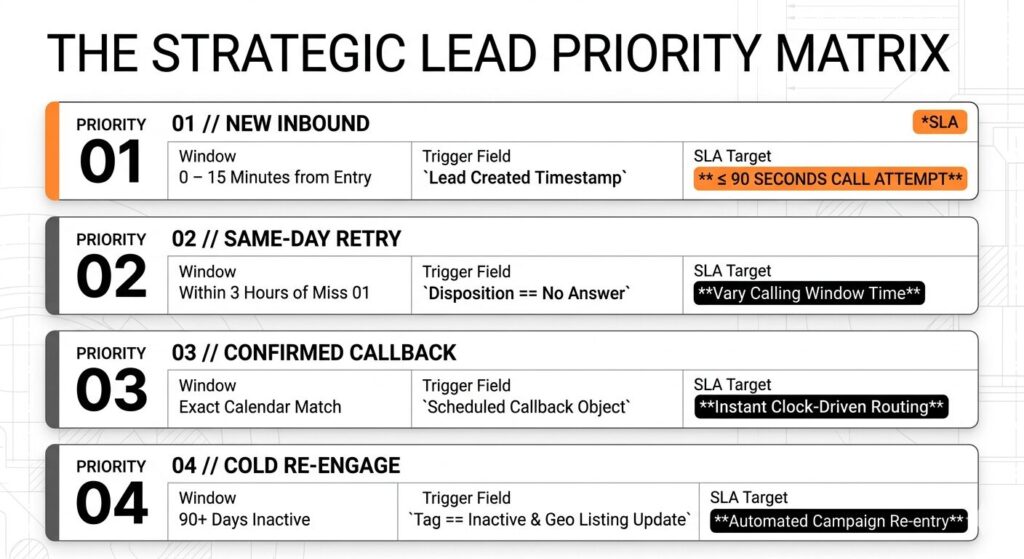
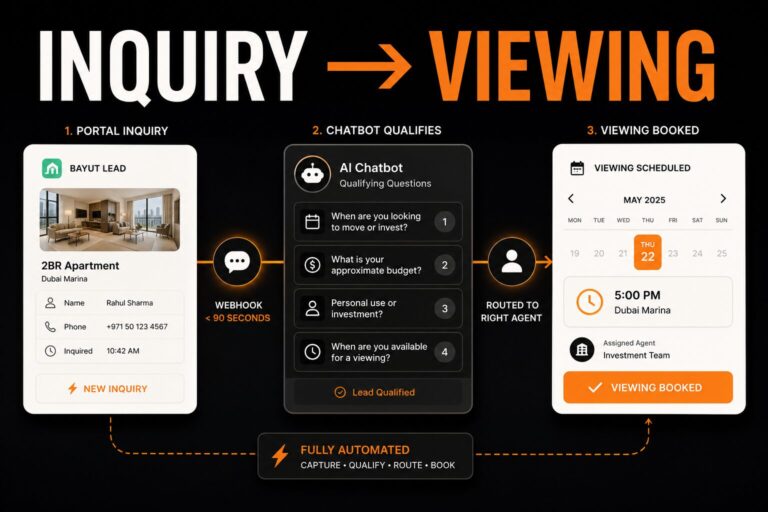
Bucket one: New Inbound (0 to 15 minutes). Any lead that submits a portal inquiry, fills a website form, or sends a WhatsApp message enters this bucket immediately. The SLA for a first call attempt is 90 seconds or less. This bucket always dials before any other list in the queue.
Bucket two: No Answer, Retry Today. Leads that did not pick up on the first attempt and have not been reattempted yet today. SLA: within three hours of the first missed attempt, within the same calling window.
Bucket three: Cold Re-engage (90-plus days quiet). Leads that entered the CRM, received two or three touches, and went quiet. These feed a re-engagement campaign triggered by a CRM tag or a date condition, typically connected to a new listing in the area the lead originally inquired about.
Bucket four: Confirmed Callback. Leads who asked the agent or the AI caller to call back at a specific time. These slot directly into the agent’s calendar-driven call queue and fire at the scheduled minute.
Research on real estate lead conversion consistently shows that the probability of qualifying a lead drops by more than 80 percent when the first contact attempt arrives after five minutes from the moment of inquiry, making the New Inbound bucket and its sub-two-minute call SLA the highest-ROI configuration in any CRM-dialer setup.
Prioritization rules that cut speed-to-lead
Assign ownership immediately when a lead record is created. A lead without an owner is not in anyone’s queue. Sort the New Inbound bucket by created timestamp descending. Lock the list so reps cannot manually select older records. Set an SLA timer: if 15 minutes pass without a logged call attempt on a new lead, escalate to the team lead or reassign automatically. Filter every bucket by recipient time zone and restrict calling to 8am to 9pm local time before the call leaves the queue.
Harvard Business Review research on lead response time found that companies contacting web-generated leads within one hour of inquiry were nearly seven times more likely to qualify the lead than companies that waited 24 hours, establishing speed-to-lead as the single variable most directly correlated with pipeline conversion from inbound real estate leads.
Step 2: Configure Dispositions and Follow-Up Triggers
Dispositions are the structured outcomes a rep selects at the end of each call. Without them, the CRM has a call log but no actionable data. With them, the CRM knows what to do next for every lead automatically.
The eight dispositions a real estate dialer needs
The eight standard dispositions for a real estate brokerage are: Connected, Left Voicemail, No Answer, Wrong Number, Do Not Call, Callback Scheduled, Qualified, and Not Interested. Eight is the practical ceiling. More than ten and reps start picking randomly to clear the queue, destroying the data quality the system was built to create.
What each disposition should trigger automatically in the CRM
Connected: update the last-contact date, move the lead to the appropriate pipeline stage, create a follow-up task with a due time based on what was discussed in the call. Left Voicemail: log the voicemail drop in the activity history, create a callback task due in four hours. No Answer: create a retry task due in three hours. Wrong Number: flag the number as invalid, update the phone field, remove the record from the active dialing queue. Do Not Call: apply the opt-out tag immediately, remove from all active sequences, log the DNC request with a timestamp. Callback Scheduled: create the calendar event, send an SMS confirmation to the lead, create a task alert 15 minutes before the scheduled time. Qualified: notify the assigned agent, route to the appointment booking workflow, update the deal stage. Not Interested: tag for re-engagement in 90 days, remove from active call sequences.
Step 3: Write the Scripts for Human Calls and AI Calls
A calling script is not a word-for-word reading. It is a structure: a defined opening, qualifying questions in sequence, and a close with a clear next step. The structure produces consistency across every rep without sounding robotic.
Script structure for a warm portal lead
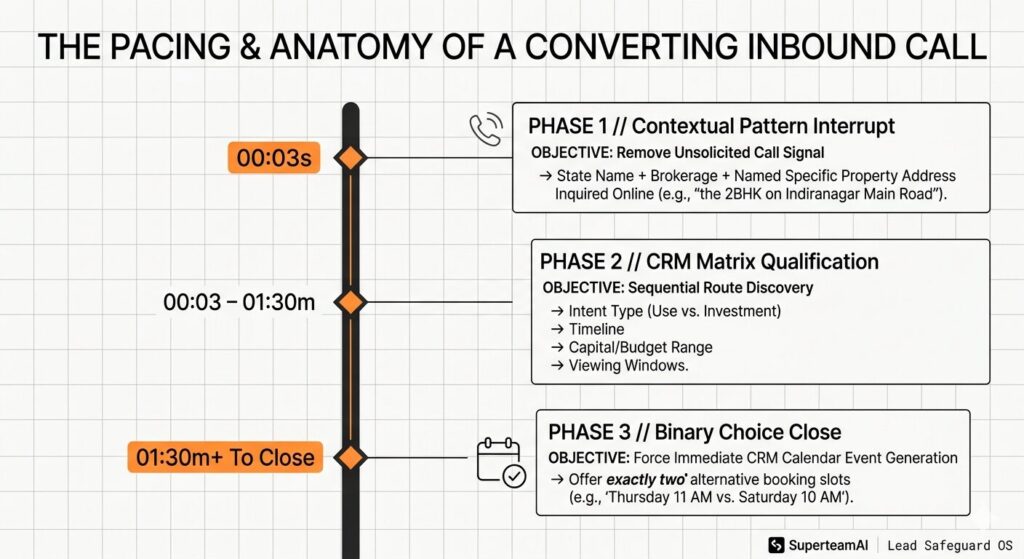
Opening (first three seconds): state your name, your brokerage, and the specific property the lead inquired about. “Hi, this is [name] from [brokerage], calling about the 2BHK on Indiranagar Main Road you asked about on MagicBricks.” Naming the property in the opening confirms the lead’s context and removes the unsolicited-call signal from the first second of the conversation.
Qualifying questions (60 to 90 seconds): ask four questions in order. One: are they looking for personal use or investment? Two: what is their timeline? Three: what is their budget range? Four: when would they be available for a viewing? Each answer routes the lead to a specific pipeline stage and follow-up sequence in the CRM.
Close: offer two specific viewing slots, not an open invitation. “I have Thursday at 11am or Saturday at 10am. Which works better for you?” Two options force a decision. An open-ended “when would you like to come?” introduces delay and loses the close.
Where AI calling handles the call differently than a human ISA
A human ISA runs the same structure with natural variation and judgment on objections. An AI caller runs the structure with zero variation and perfect consistency, which is an advantage for qualification at scale and a limitation for complex objection handling beyond the script depth. The practical split: AI handles the New Inbound bucket (Workflow 1) and the No Answer Retry bucket (Workflow 2) for all leads below a defined qualification score. A human ISA handles leads above the threshold, luxury property inquiries, and any lead who explicitly requests a human contact. For the full AI calling workflow and the four automation patterns, see how AI cold calling for real estate handles every missed lead.
Step 4: Protect Pickup Rates Before the First Campaign
The dialer configuration is only as effective as the pickup rate it achieves. Three variables determine whether leads answer: caller ID trust, number health, and data quality. All three require active configuration before the first campaign goes live.
Local presence, CNAM, and STIR/SHAKEN configuration
Local presence matches your outbound caller ID to the prospect’s area code, signaling a local call rather than a solicitation from an unfamiliar region.
Real estate outbound calling campaigns that use local presence dialing, matching the outbound caller ID to the prospect’s area code, report answer rate improvements of 20 to 40 percent compared to campaigns placing calls from a fixed, non-local caller ID number, based on aggregated dialer platform data across residential real estate lead lists in the US market.
CNAM registers your business name with voice carriers so your brokerage name appears alongside your number on the recipient’s screen instead of a blank label. Registration goes through your voice provider. STIR/SHAKEN is the FCC-mandated caller ID authentication framework that assigns an attestation level to your outbound calls based on your provider’s verification of your identity as the calling party.
STIR/SHAKEN, the FCC-mandated caller ID authentication framework, assigns an attestation level to outbound calls that downstream carriers use as a trust signal when deciding whether to pass, label, or block the call; calls with full attestation are correlated with lower carrier blocking rates, making STIR/SHAKEN configuration a direct variable in pickup rate for any high-volume outbound dialing operation in the US.
Number hygiene rules that prevent spam labeling
Cap retry attempts at three per lead per week and vary the time of each attempt rather than calling at the same hour repeatedly. Carriers associate high-frequency same-pattern retries with robocalling and flag numbers accordingly. Keep each number in your pool active with consistent daily traffic rather than spiking volume on campaign launch days. When a number gets flagged, quarantine it immediately rather than waiting for pickup rates to drop across the full pool. Validate phone numbers before they enter any dialing queue: E.164 formatting, deduplication, and landline removal reduce the calling patterns that carriers associate with spam.
High-volume outbound dialing operations consistently identify dirty CRM data, including wrong numbers, disconnected lines, missing time-zone fields, and duplicate records, as the primary driver of low connect rates in power dialer campaigns, preceding spam-flagged numbers as the second cause and outpacing call timing or script quality in reducing connects-per-hour performance.
Step 5: Measure the Workflow
A dialer that produces more calls without producing more conversations is not delivering ROI. Two metrics determine whether the CRM-dialer setup is working. Track both from the first day the dialer goes live.
Connects per hour and what the number means
Connects per hour counts live conversations, not dials or attempts. A well-configured power dialer on warm portal inquiry leads should produce 8 to 12 connects per hour for a single rep. Below 6 connects per hour signals a data quality problem (bad numbers, wrong time zones), a list prioritization problem (cold leads mixed with warm), or a pickup rate problem (spam-flagged numbers burning through the queue). Above 12 on a warm list confirms the dialer and prioritization configuration are calibrated correctly.
Disposition accuracy and how to improve it
Disposition accuracy is the percentage of calls that receive a valid, structured outcome before the rep moves to the next number. Target 95 percent or higher. Below 90 percent means reps are selecting random outcomes to move on, which prevents the CRM from building accurate follow-up queues. The fix is not coaching. It is limiting the disposition list to eight or fewer options, defining each with a single clear sentence, and making selection mandatory before the next number loads.
Brokerage dialing programs that track both connects per hour and disposition accuracy alongside call volume report 30 to 50 percent higher lead-to-appointment conversion rates from their dialer campaigns compared to programs tracking call volume as the primary metric, based on CRM-dialer platform performance data across outbound real estate sales teams.
When the CRM-Dialer Setup Becomes the Ceiling
A well-configured CRM with a power dialer solves the volume and consistency problem for a team of 2 to 10 agents. It does not solve the 24/7 availability problem or the consistent follow-up problem for a brokerage managing portal leads from MagicBricks, Bayut, and Zillow simultaneously across multiple agents and time zones.
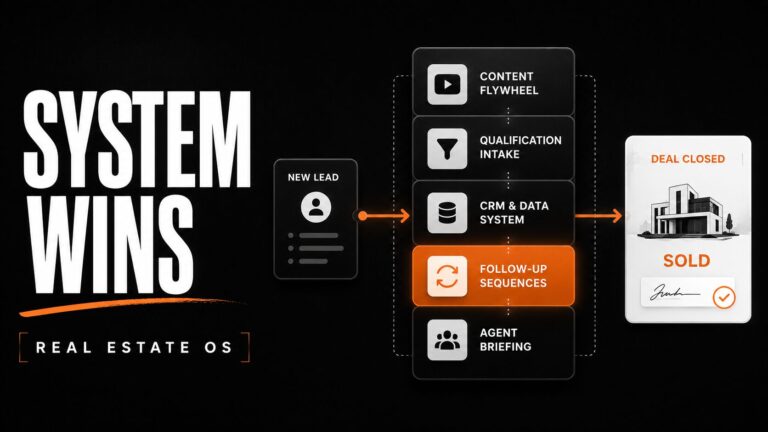
At that point, the dialer is no longer the right layer. The right layer is an AI voice agent that handles all four calling workflows automatically, connects directly to the CRM and the calendar, writes back every call outcome in real time, and routes qualified leads to agent calendars without a human ISA touching the qualification step. Phase 1 of the SuperteamAI brokerage OS, called Lead Safeguard, is built on exactly this architecture for brokerages in India, Dubai, and the US.
Book a call see how the SuperteamAI Lead Safeguard module replaces the CRM-dialer stack with a fully integrated AI calling OS