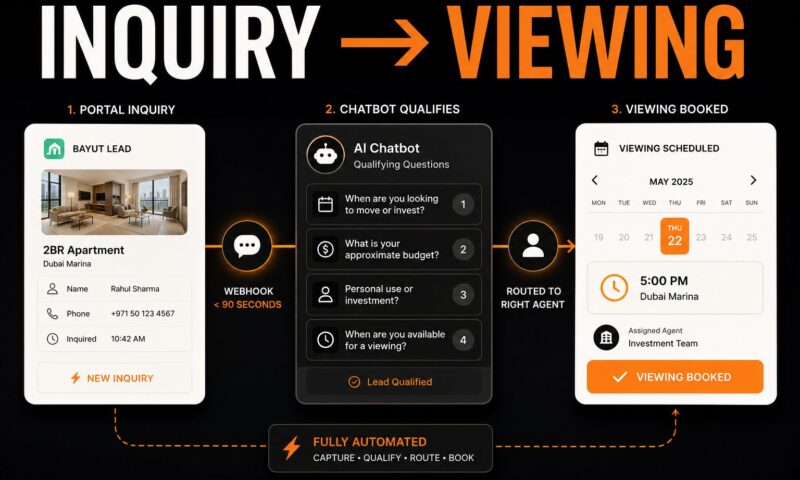
A chatbot captures a real estate lead the moment a portal inquiry arrives, sends a qualifying message within 90 seconds, asks four questions to determine budget, timeline, use case, and availability, and routes the qualified lead to the right agent with a booked viewing slot. The setup takes five working days. The difference in contacted-lead rate is immediate.
What the Chatbot Is Actually Doing in a Lead Generation Stack
Most brokerages deploy a chatbot thinking of it as a lead capture tool – something that collects a name and email and passes it to the CRM. That framing produces disappointing results. The chatbot is a system component, not a standalone tool. It captures the inquiry, qualifies the lead, routes to the right agent, books the viewing, and triggers the follow-up sequence if the lead does not respond. None of those steps happen without deliberate configuration.
The difference between a lead capture tool and a lead generation system
A lead capture tool collects contact information. A lead generation system moves a stranger from inquiry to booked viewing without a human touching the process. The chatbot is the first node in that system. It determines which leads get routed for immediate agent action and which leads enter an automated nurture sequence. A chatbot configured only for contact capture leaves the qualification, routing, and follow-up to the agent – which means those steps happen inconsistently, late, or not at all.
Why the trigger point matters more than the script
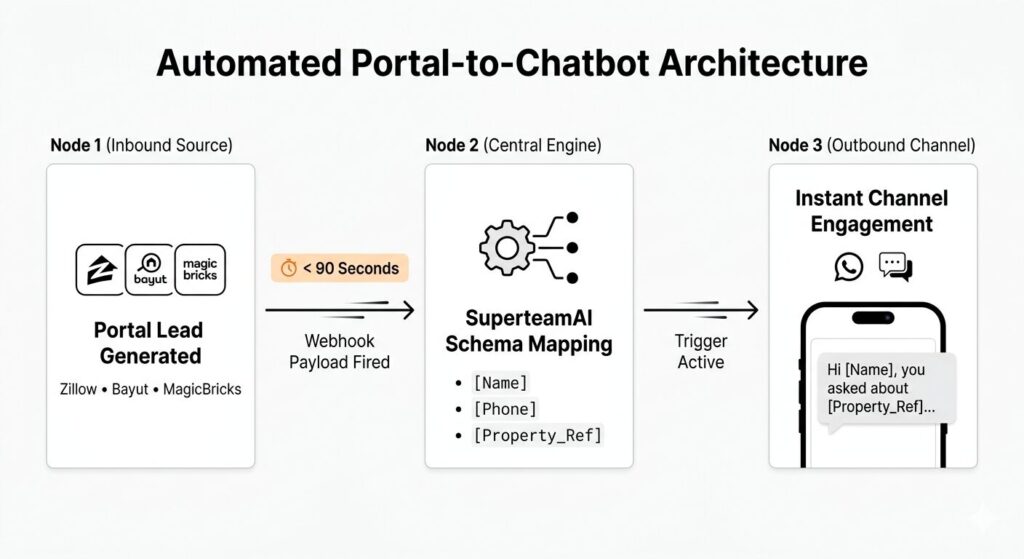
The two most common chatbot triggers in real estate are fundamentally different. A website visitor trigger fires when someone lands on a listing page and stays for more than a set number of seconds. A portal lead trigger fires within 90 seconds of a new inquiry arriving from MagicBricks, Bayut, PropertyFinder, or Zillow via a webhook. Most brokerages configure only the website trigger and skip the portal trigger entirely. The portal trigger is more valuable because the lead has already identified a specific property, expressed buying intent, and submitted contact information. Getting the portal trigger right is the first decision, before any script is written.
Real estate brokerages that configure the portal lead webhook trigger and respond to new inquiries within 90 seconds report contacted-lead rates above 95 percent, compared to 50 to 65 percent for brokerages relying on manual same-day follow-up, because the portal lead arrives with high intent and a short decision window – the lead who does not hear from one brokerage within minutes will hear from a competitor who has, according to data on lead response and contact rates across MagicBricks, Bayut, and Zillow portal lead pipelines.
Step 1 – Define Your Trigger: Portal Lead or Website Visitor
The trigger type determines the channel, the timing, and the tone of the opening message. They require different configuration paths and serve different lead profiles.
How to configure the portal inquiry webhook for MagicBricks, Bayut, and Zillow
93 percent of homebuyers begin their property search online before contacting an agent, and the brokerage that responds to the digital inquiry first earns the in-person relationship, making the chatbot trigger architecture the single highest-leverage configuration decision in a real estate lead generation setup, according to NAR research on homebuyer digital behavior and agent selection patterns in residential real estate.
MagicBricks, 99acres, and Housing.com send new lead data to a configured endpoint via webhook or email-to-CRM forwarding. Bayut and PropertyFinder in Dubai offer API-level lead delivery for brokerages on their premium plans. Zillow delivers leads via its Premier Agent API. In all three markets, the setup path is: configure the portal to send new lead data to the chatbot platform’s webhook URL, map the inquiry fields (name, phone, property reference, inquiry time) to the chatbot’s trigger schema, and set the response delay to under 90 seconds. The brokerage specifies the property reference field – that is what allows the opening message to name the specific listing the lead inquired about, rather than sending a generic follow-up.
Step 2 – Write the Qualifying Script
The script is the part most brokerages spend too much time on before getting the trigger right. Four questions, asked in the right order, produce everything an agent needs to decide whether a lead is worth a showing.
The four qualifying questions every real estate chatbot needs
Leads contacted within five minutes of submitting a portal inquiry are 100 times more likely to convert into a booked appointment than leads contacted 30 minutes later, and the conversion probability drops by a further factor of 10 at the 60-minute mark, making the chatbot’s opening message the most time-sensitive element in the lead generation setup, according to InsideSales.com research on lead response time and conversion across B2C sales categories including residential real estate.
Question one is timeline: “When are you looking to move or invest?” This separates active buyers with a sub-90-day window from early browsers with a 6-plus month horizon. Question two is budget: “What is your approximate budget for this property?” This confirms the lead can afford what they inquired about and flags mismatches before an agent wastes a showing on a misaligned lead. Question three is use case: “Are you buying for personal use or as an investment?” This determines which agent or team the lead routes to. Question four is availability: “When are you free for a viewing this week or next?” This moves the conversation directly toward booking without a separate scheduling step.
A sample chatbot conversation flow you can use immediately
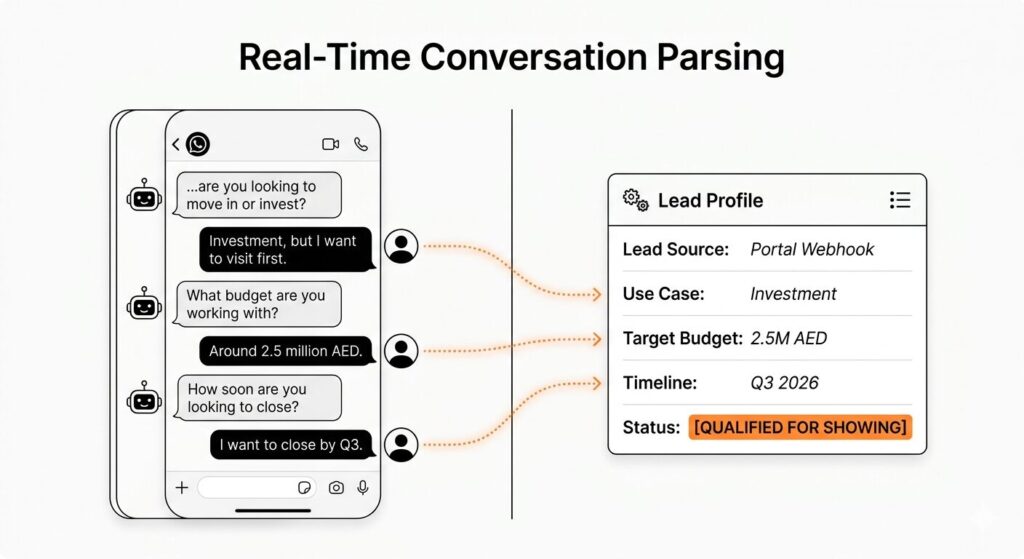
The following is a WhatsApp-first flow for a Bayut lead who inquired about a 2-bedroom apartment in Dubai Marina.
Chatbot: “Hi [Name], this is [Brokerage]. You asked about the 2BR on Marina Walk – it is still available. Quick question: are you looking to move in or is this an investment opportunity?”
Lead: “Investment, but I want to visit first.”
Chatbot: “Got it. What budget are you working with for this unit?”
Lead: “Around 2.5 million AED.”
Chatbot: “That fits well. How soon are you looking to close – is this a 2026 decision or are you still exploring?”
Lead: “I want to close by Q3.”
Chatbot: “We have availability for a viewing on Tuesday at 3pm or Thursday at 5pm. Which works better?”
Lead: “Thursday.”
Chatbot: “Confirmed. Thursday [date] at 5pm – you will receive a reminder the day before. Our team will call with the exact address.”
The CRM now holds: lead name, phone, investment use case, 2.5M AED budget, Q3 2026 timeline, viewing confirmed for Thursday. The agent walks into that showing with a full briefing and zero cold-call risk. For the full breakdown of how the chatbot fits inside the AI OS at the brokerage level, see what a real estate AI chatbot does across the full lead pipeline.
Step 3 – Connect to WhatsApp for India and Dubai
For brokerages in India and Dubai, WhatsApp is not an optional channel. A chatbot running only on the website chat widget misses most of the leads it is supposed to capture.
WhatsApp Business API setup for portal lead response
Over 90 percent of real estate communication in Dubai happens via WhatsApp, including the majority of investor inquiries from GCC markets such as Saudi Arabia, Kuwait, and Qatar, making a website-only chatbot deployment structurally insufficient for capturing and qualifying high-value leads in the Dubai residential and off-plan property market, where evening and weekend inquiries from GCC investors arrive when no ISA is available to respond.
The WhatsApp Business API requires a verified business phone number connected through an approved Business Solution Provider such as 360dialog, Twilio, or the chatbot platform’s native WhatsApp integration. The setup sequence: create a Meta Business Manager account, verify the brokerage as a business entity, register the outbound phone number, obtain the API key from the BSP, connect the chatbot platform to the API, and submit the opening message template for Meta approval. Template approval takes 24 to 48 hours and requires the message to reference a specific business context rather than promotional or generic language.
The first WhatsApp message that gets leads to respond
The opening WhatsApp message arrives as an unsolicited message in a personal chat. It must pass the “is this spam?” filter within two seconds. Three elements make it work: the brokerage name in the first four words, the specific property the lead inquired about, and a question rather than a statement. “Hi [Name], this is [Brokerage]. You asked about the 3BHK on 99acres in Andheri West – it is still available. Are you looking for personal use or investment?” That message gets a response. A generic “Dear valued customer, thank you for your inquiry” does not.
Step 4 – Set Up CRM Routing Rules
A chatbot that qualifies leads without routing them generates data without generating action. The routing rules determine which agent receives the lead and how quickly.
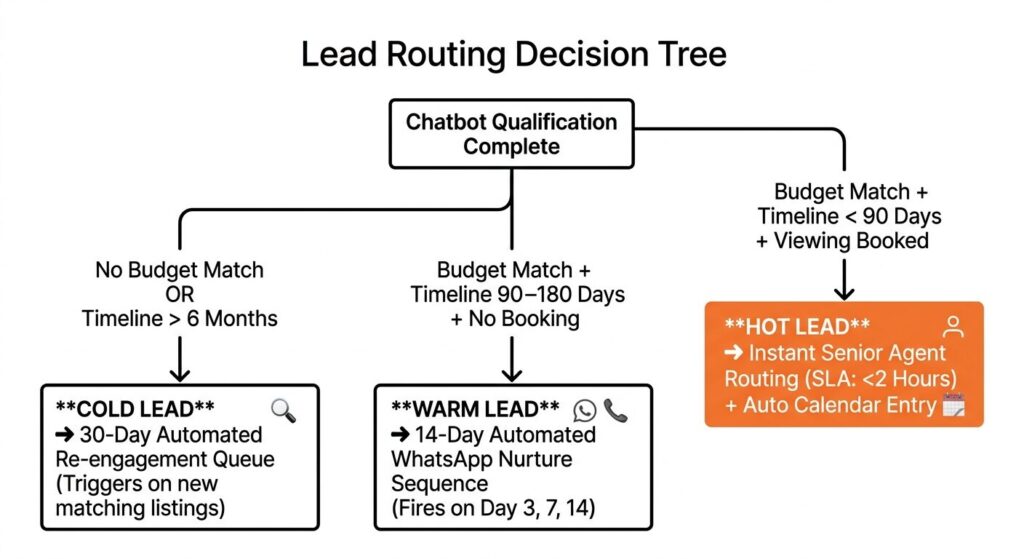
The routing decision tree that separates hot leads from nurture leads
Real estate teams using AI chatbots for lead qualification report three times higher conversion rates and 35 percent lower cost per lead compared to teams relying on manual ISA follow-up for the same portal lead sources, with the majority of the performance gap attributed to routing speed and qualification consistency rather than chatbot conversation quality, according to research on AI chatbot ROI in real estate lead generation across US, India, and Dubai brokerage operations.
Three routing outcomes cover the full lead profile. A hot lead has confirmed a budget within range, a timeline under 90 days, and a viewing slot booked inside the chatbot conversation. This lead routes immediately to the senior agent or investment team with the full conversation transcript attached and a calendar notification fired. The agent’s response SLA: under 2 hours to confirm the booking details. A warm lead has confirmed a budget but has a timeline of 90 to 180 days and has not booked a viewing. This lead enters a 14-day nurture sequence: a WhatsApp follow-up at day 3, a property update message at day 7, and a direct outreach at day 14. A cold lead has not confirmed a budget or has a timeline beyond 6 months. This lead enters a re-engagement queue with a 30-day trigger when a relevant new listing comes on in the area of interest.
Step 5 – Connect the Calendar and Test the Booking Flow
The calendar integration is where most chatbot setups fail silently. The chatbot presents slots that look available but do not reflect the agent’s real schedule, or the booking writes to the chatbot dashboard but not to the agent’s calendar.
What to verify before going live
Five checks before launch. One: the chatbot queries the agent’s live calendar rather than a static pre-set list of slots. Two: a booking made in the chatbot creates a calendar entry and fires a confirmation to the lead within 60 seconds. Three: the CRM lead record is created or updated at the moment of booking, not in a batch sync that runs hourly. Four: when the lead asks a question outside the qualifying script – “Does the property have parking?” – the chatbot either answers from the listing database or hands off to a human without looping on the same question. Five: the 24-hour reminder sequence is active and sending to a test number before go-live.
The 24-hour reminder sequence that prevents no-shows
Automated appointment reminder sequences sent 24 hours before a scheduled property viewing reduce missed viewings by 28 percent and increase total monthly bookings by 33 percent compared to manual reminder calls, with the improvement most pronounced for evening and weekend appointments where agents are least likely to call proactively and leads are most likely to forget the confirmed time if not reminded, according to industry data on appointment automation in real estate brokerage operations.
The reminder message should confirm the time, the property address, and the agent’s name. It should include a one-tap option to reschedule rather than a phone number to call. Leads who need to reschedule will do so if it is easy. They will ghost if it requires a phone call. A rescheduled viewing is better than a no-show for both the lead’s calendar and the agent’s.
Step 6 – Measure What Actually Matters
Chat-to-appointment rate and cost per booked appointment
28 percent of real estate businesses have adopted live chat technology, making it the leading AI application in the sector, but fewer than 20 percent of those deployments track chat-to-appointment rate as the primary conversion metric, with the majority measuring response time and chat volume instead, which are useful for debugging but do not directly measure whether the chatbot is producing revenue, according to LocalIQ research on chatbot adoption and performance measurement practices in real estate.
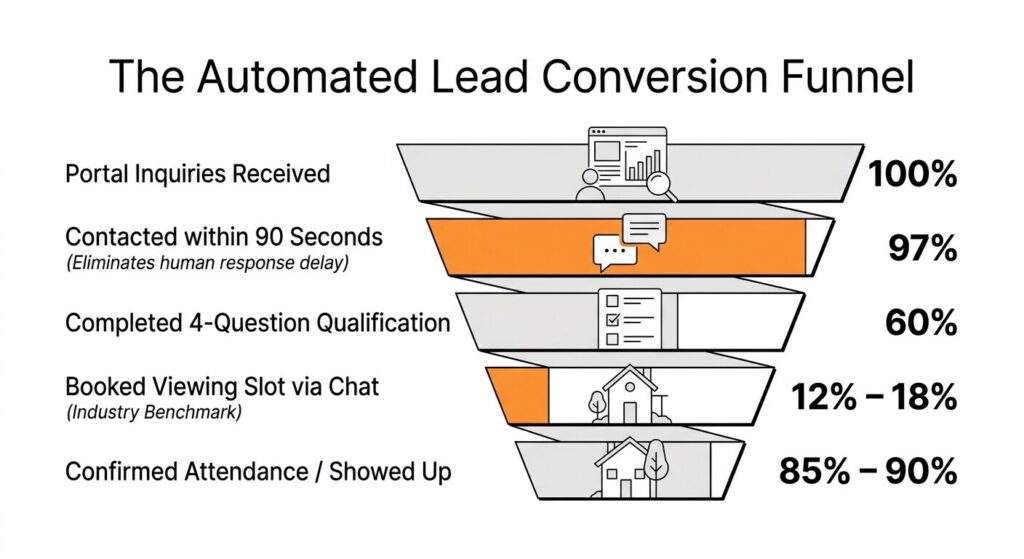
Two metrics determine whether the deployment is working. Chat-to-appointment rate is the number of booked viewings generated by the chatbot in a month divided by the number of portal leads the chatbot contacted that month. A well-configured deployment running the portal trigger and WhatsApp-first flow should produce a 12 to 18 percent chat-to-appointment rate. Below 10 percent signals a script calibration or routing problem. Cost per booked appointment is the total monthly chatbot cost divided by the number of viewings booked. At 200 monthly leads and a 15 percent conversion rate, 30 appointments at a managed cost of $1,500 per month equals $50 per booked appointment. That is the number to compare against ISA cost, not the platform subscription fee in isolation.
Book a call to get the SuperteamAI chatbot deployed on your portal lead pipeline
The Setup Mistake That Kills Chatbot ROI
Why most deployments stall at 30 days and how to prevent it
72 percent of real estate owners and decision-makers are actively investing in or planning to invest in AI tools including lead qualification and response automation, but the majority of brokerage chatbot deployments that fail to produce measurable ROI within 90 days do so because the portal lead trigger was never configured, the qualifying questions were never calibrated to the brokerage’s actual price points and buyer profiles, or the CRM routing rules were live but no one monitored the hot lead queue for follow-through, according to Deloitte global real estate AI survey data on adoption barriers and implementation failure modes.
The most common failure sequence: the brokerage installs a chatbot on the website, leaves the default qualifying questions in place, skips the portal webhook configuration, and checks results at day 30. The chatbot has been collecting contact information from website visitors. No appointments have been booked because the booking flow was never connected. The brokerage concludes the chatbot does not work. The chatbot was never configured to do what it is capable of doing.Prevention requires all five setup steps completed and tested before the first live lead flows through. Portal webhook confirmed and firing within 90 seconds. WhatsApp-first flow active for India or Dubai markets. Qualifying questions calibrated to the brokerage’s actual price points and buyer profiles. CRM routing rules live with agent notification tested end-to-end. Chat-to-appointment rate in the measurement dashboard with a 30-day target set before launch. For how the AI voice layer handles leads who ignore the chatbot entirely, see how AI cold calling picks up every missed portal lead. For the CRM and dialer stack the chatbot feeds into, see the CRM-dialer setup that connects to the AI calling layer.